
Event WiFi & Networking: Why Your Venue's Internet Isn't Enough
You've booked the venue, confirmed the speakers, and planned every detail of your corporate conference. Then 500 attendees walk through the doors, connect to the hotel WiFi, and everything grinds to a halt. Slides won't advance over the wireless presenter. The live stream buffers and drops. The event app can't load poll results. Attendees complain they can't check email, let alone participate in interactive sessions. The venue's IT team shrugs — their network was never designed for this.
This scenario plays out at conferences and corporate events every single week. It's one of the most preventable failures in event production, yet it catches experienced planners off guard because WiFi feels like it should "just work." The truth is that venue internet and professional event WiFi networking are fundamentally different things, and understanding that difference is critical to running a successful event.
Why Venue WiFi Fails at Conferences
Hotels, convention centers, and conference venues provide internet access for their day-to-day operations: guests checking email, browsing the web, and streaming the occasional video in their rooms. That infrastructure is designed for casual, distributed usage across hundreds of rooms and common areas — not for 500 people in a single ballroom all hammering the network simultaneously.
The problems are structural, not just a matter of bandwidth. Most venue WiFi networks suffer from several fundamental limitations:
- Shared bandwidth. The internet connection serving your event is typically the same pipe serving guest rooms, the restaurant, the lobby, the business center, and every other meeting happening in the building. Your 500-person conference is competing with hundreds of hotel guests for the same limited bandwidth.
- No Quality of Service (QoS). Venue networks rarely prioritize traffic. A guest streaming Netflix in their room gets the same priority as your keynote speaker's presentation feed. When the network gets congested, everything slows down equally — including your mission-critical production traffic.
- No VLAN isolation. Without virtual LAN segmentation, all devices sit on the same network. Your production equipment — video switchers, streaming encoders, wireless presentation systems — shares the network with every attendee's phone, laptop, and smartwatch. One attendee's device running a background update can cause latency spikes that disrupt your live stream.
- Insufficient access point density. Venue WiFi typically uses a small number of access points spread across large areas. When 500 people crowd into a ballroom, those few APs become overwhelmed. Each access point can only handle a limited number of simultaneous connections before performance degrades dramatically.
- Consumer-grade hardware. Many venues use access points and switches designed for light commercial use, not for the high-density environments that conferences create. These devices lack the processing power, memory, and radio management capabilities needed to handle hundreds of concurrent connections cleanly.
What Dedicated Event WiFi Looks Like
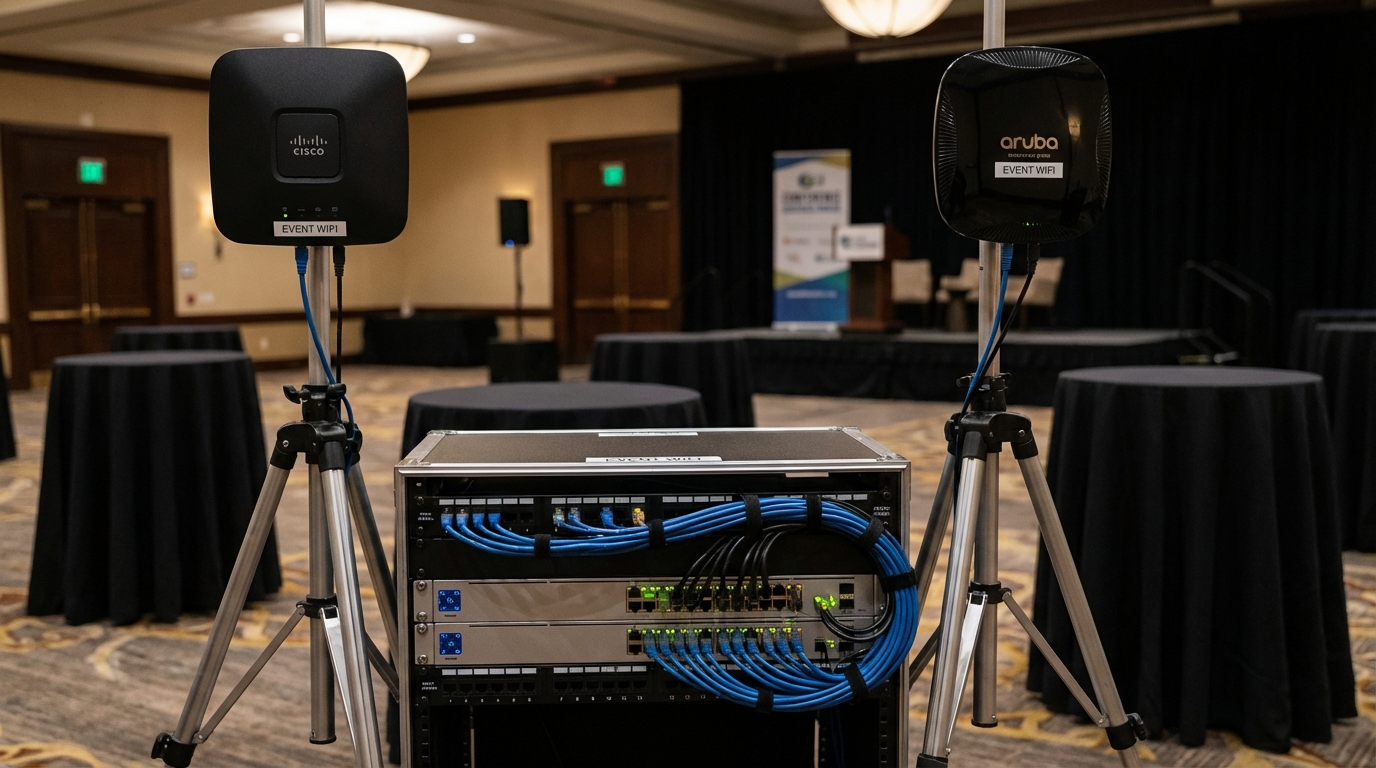
Professional event networking is a purpose-built system designed specifically for the density, reliability, and performance demands of a live event. It's an entirely separate infrastructure from the venue's house network, and it's engineered from the ground up to handle exactly what your event requires.
A proper event WiFi deployment includes several key components:
- Enterprise-grade access points. High-density APs from manufacturers like Ruckus, Cisco, or Aruba are deployed strategically throughout the event space. These APs are designed to handle 100+ simultaneous connections each, with advanced radio management that dynamically adjusts channels and power levels to minimize interference.
- Dedicated internet uplinks. Rather than sharing the venue's existing connection, a professional event network brings in its own dedicated internet circuit — often a temporary fiber connection or bonded cellular uplink — with guaranteed bandwidth exclusively for your event.
- VLAN segmentation. The network is divided into isolated virtual LANs for different purposes: one for production equipment (video, audio, lighting control), one for presenters, one for attendee access, and one for back-of-house operations. This isolation ensures that attendee traffic can never interfere with production-critical systems.
- Quality of Service policies. Network traffic is prioritized intelligently. Live streaming feeds get the highest priority. Presentation systems and interactive polling platforms come next. General attendee web browsing gets whatever bandwidth remains. This ensures that the most important traffic always gets through, even under heavy load.
- Network monitoring and management. A dedicated network engineer monitors the system in real time throughout the event, watching for congestion, interference, rogue devices, and other issues. Problems are identified and resolved before they impact the event.
Bandwidth Requirements by Event Type
Understanding how much bandwidth your event actually needs is essential for proper planning. The requirements vary dramatically depending on what your event involves. Here are realistic bandwidth estimates based on our production experience:
Presentations and Slide-Based Content
A standard corporate presentation with slides, occasional video clips, and wireless presenter connectivity requires relatively modest bandwidth — roughly 5 to 10 Mbps for the production side. However, if presenters are using cloud-based presentation tools (Google Slides, web-based demos), they need a reliable, low-latency connection that won't drop mid-presentation. For 500 attendees who also need basic web access during the session, plan for 50 to 100 Mbps of dedicated attendee bandwidth.
Live Streaming and Webcasting
Live streaming is where bandwidth requirements escalate quickly. A single 1080p live stream to a platform like YouTube, Vimeo, or a custom RTMP endpoint requires 5 to 10 Mbps of sustained, uninterrupted upload bandwidth. If you're streaming to multiple platforms simultaneously or producing a multi-camera hybrid event with remote participants on Zoom or Teams, you'll need 20 to 50 Mbps of dedicated upload bandwidth just for production. And this must be completely isolated from attendee traffic — one network hiccup can kill a live stream.
App-Based Polling and Audience Interaction
Interactive event apps, live polling platforms like Slido or Mentimeter, and audience Q&A tools generate surprisingly bursty traffic. When a speaker asks 500 people to submit a poll response simultaneously, the network sees a spike of 500 near-simultaneous HTTP requests. Without adequate access point density and bandwidth headroom, these spikes cause timeouts and failed submissions — defeating the purpose of the interactive element. Plan for 20 to 50 Mbps of headroom above your baseline attendee bandwidth to handle these bursts cleanly.
Exhibit Halls and Trade Shows
Exhibit halls are the most demanding WiFi environments. Each booth may have its own demos, video displays, lead capture tablets, and point-of-sale systems, all requiring reliable connectivity. Add in hundreds of attendees browsing the floor with their phones connected, and you can easily need 200+ Mbps of bandwidth with extremely high access point density — one AP for every 30 to 50 users.
Wired vs. Wireless: When You Need Hardlines
WiFi has improved enormously, but it's still a shared medium that's inherently less reliable than a physical cable. For mission-critical event systems, wired ethernet connections are non-negotiable. Here's when you should always insist on hardlines:
- Live streaming encoders. Your stream encoder should always be on a wired connection. A single WiFi dropout can cause a visible glitch or complete stream failure that every remote viewer sees.
- Video and audio production networks. NDI video feeds, Dante audio networks, and lighting control systems (like sACN or Art-Net) require low-latency, jitter-free connections that only wired ethernet can guarantee.
- Presenter laptops at the podium. If a presenter is running a live web demo or video call, hardwire their laptop. WiFi in a room full of 500 devices is unpredictable; a cable is not.
- Registration and check-in stations. These systems need to work flawlessly from the moment doors open. A wired connection eliminates the risk of WiFi congestion during the arrival rush.
- Point-of-sale and payment processing. If your event includes any form of payment processing, wired connections are both more reliable and more secure.
A well-designed event network uses wired connections for everything critical and reserves WiFi for attendee access and secondary systems. Your AV provider should run ethernet drops to every production position, presenter station, and registration desk well before doors open.
Network Security for Corporate Events
Corporate events present a tempting target for bad actors. You have hundreds of corporate laptops on a shared network, executives accessing sensitive email, and potentially confidential presentation content flowing across the wire. Network security isn't optional — it's a core requirement.
A professional event network should include these security measures at minimum:
- VLAN isolation between user groups. Attendees should never be able to see or access production equipment, presenter devices, or back-of-house systems. Proper VLAN segmentation with firewall rules between segments prevents lateral movement across the network.
- WPA3-Enterprise or WPA2-Enterprise encryption. Open WiFi networks (or networks with a shared password posted on a sign) offer no real security. Enterprise-grade encryption with individual credentials or certificate-based authentication is the standard for corporate events handling sensitive data.
- Client isolation on attendee networks. Even within the attendee VLAN, devices should be isolated from each other. An attendee's laptop shouldn't be able to discover or communicate with another attendee's device on the same network.
- Content filtering and intrusion detection. A managed firewall with content filtering blocks malicious traffic, and intrusion detection systems alert your network engineer to suspicious activity in real time.
- Captive portal with terms of service. A branded login page that requires attendees to accept terms of service before gaining network access provides both a professional experience and a legal layer of protection.
If your event involves government agencies, healthcare organizations, financial institutions, or any industry with regulatory compliance requirements, the network security standards will be even more stringent. Discuss these requirements with your AV and networking provider early in the planning process.
The Role of Your AV Company in Event Networking
Networking and AV production are deeply intertwined at modern events. Your video switchers, streaming encoders, wireless microphone systems, digital signage, and interactive tools all depend on reliable network connectivity. That's why the best AV companies treat networking as a core production element, not a separate concern handled by someone else.
When your AV provider manages your event network, several things happen that wouldn't occur if networking were handled independently:
- Integrated planning. The network is designed around the specific production requirements of your event. The AV team knows exactly what bandwidth, latency, and reliability each system needs because they're the ones operating those systems.
- Single point of accountability. If the live stream drops, you don't want your AV company pointing at the network team and vice versa. When one team owns both, problems get solved instead of blamed.
- Coordinated troubleshooting. An AV technician who understands networking can diagnose whether an issue is a network problem or an equipment problem in seconds, rather than spending valuable event time figuring out who should be fixing it.
- Production-aware QoS. Your AV team knows exactly when the keynote is about to start, when the live stream goes live, and when the audience polling segment begins. They can adjust network priorities in real time to match the production flow.
Questions to Ask Your Venue About Internet
Before you sign a venue contract, get clear answers to these questions. The responses will tell you exactly how much additional networking infrastructure you'll need to bring in:
- What is the total internet bandwidth available to the building? Get a number in Mbps, not a vague "high-speed" answer. Ask whether this is a shared or dedicated connection.
- How much bandwidth can be dedicated exclusively to our event? "Dedicated" means guaranteed and isolated, not "we'll try to prioritize it."
- How many WiFi access points are in the event space? Ask for the specific models and their maximum client capacity. If the venue can't answer this, that's a red flag.
- Can we bring in our own networking equipment? Some venues restrict outside network equipment or charge fees for using non-house infrastructure. Know this upfront.
- Are wired ethernet drops available in the event space? Find out how many ports are available, where they're located, and what speed they support (100 Mbps vs. 1 Gbps).
- Can you provide a dedicated VLAN for our production equipment? If the venue's IT team can create an isolated VLAN on their existing infrastructure, this can reduce the amount of external equipment needed.
- What are the internet costs? Venue internet is often one of the most expensive line items. Get detailed pricing for bandwidth tiers, wired drops, and any network support fees so you can compare against bringing in an independent solution.
- Is there a loading dock or pathway for running temporary fiber? If you're bringing in a dedicated internet circuit, you need a physical path from the building's telecom demarcation point to your event space.
Event Networking Planning Checklist
Use this quick reference when planning the networking component of your next event:
- ✓ Assess venue internet early — Ask the questions above during site selection, not after you've signed the contract.
- ✓ Calculate your bandwidth needs — Add up production, streaming, interactive, and attendee requirements separately.
- ✓ Plan VLAN segmentation — Define separate networks for production, presenters, attendees, and back-of-house.
- ✓ Require hardlines for critical systems — Streaming encoders, production networks, presenter stations, and registration.
- ✓ Define security requirements — VLAN isolation, encryption standards, client isolation, and compliance needs.
- ✓ Hire an AV partner who handles networking — Integrated AV and network management eliminates finger-pointing and speeds troubleshooting.
- ✓ Test everything before doors open — Run a full network load test during rehearsal to validate performance under realistic conditions.
Don't Let WiFi Be the Weak Link
Networking is the invisible backbone of every modern corporate event. When it works, nobody notices. When it fails, everyone notices — and it can undermine thousands of dollars of AV production, frustrate your attendees, and damage your organization's reputation. The good news is that event networking is a solved problem. With proper planning, the right equipment, and an experienced team managing the infrastructure, your event network will be as reliable as the power coming out of the walls.
At Astro Audio Visual, we approach event networking as a core component of every production. We design, deploy, and manage dedicated event networks that are engineered for the specific demands of your conference, trade show, or corporate meeting. From enterprise access points to dedicated fiber uplinks to real-time monitoring, we handle the entire networking stack so you can focus on delivering a great event. Contact our team for a free consultation, and let's make sure WiFi is the last thing you have to worry about.
Astro Audio Visual Team
Expert AV production for corporate events in San Antonio, Austin & Houston.